Planning the Office of AI Agents (for Flutter Apps)
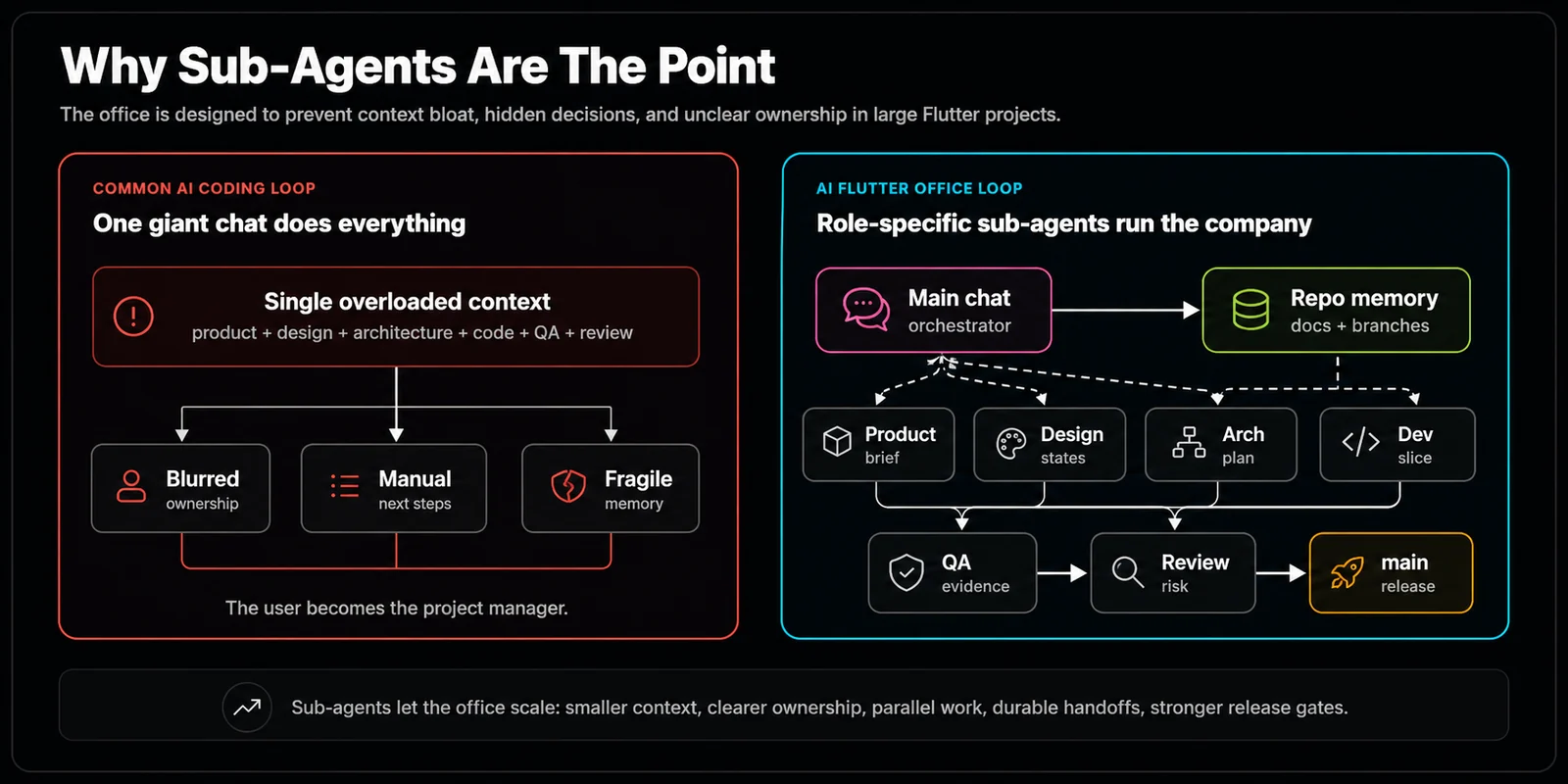
Building apps takes time, and more importantly consumes the agents' context windows. A single agent handling everything from planning to designing, developing and testing is not token efficient nor does it produce optimal outputs. Hence, I began with the Office of Agents workflow: platform-agnostic, memory-persistent, and organized like a real software team.
How I came up with the idea
I love AI Agents building me the MVP for any app idea. Most frontier models like Opus 4.6, GPT 5.5 and Gemini 3.1 pro are very capable models for most of my ideas. But most of the time, the development gets stuck in the MVP stage and it takes a lot of prompting and multiple context sessions to polish the initial MVP. One of the main issues is that the traditional Agentic development relies heavily on a single chat session and expects the model to take in all the information at once, before answering your "How to center this image" question.
Honestly, even human devs would lose their mind if they consumed every single line of code and planning and revisions of the project in their working memory before adding a new social button to a contact page. It's far less efficient and the interesting thing is that we have already solved this limited working memory problem in humans for decades.
We deal with this problem by writing things down! If we have more people, we hand them off the plan, tasks and expected outputs. We have been doing this for like forever. So why not let AI agents share the same workflow that we have been using for millennia?
---
1. The Office of Agents Architecture
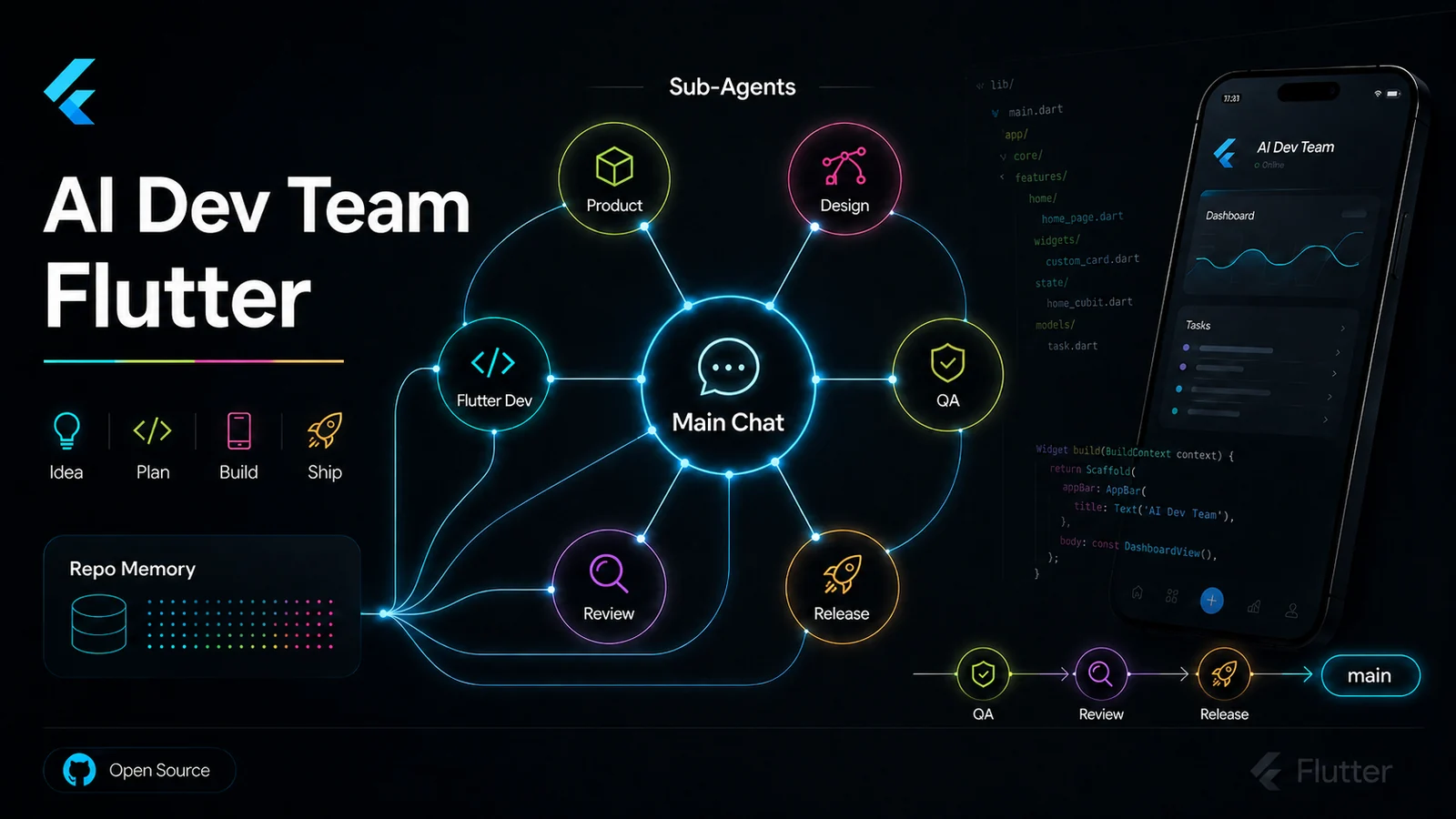
This project is nothing but an organized set of prompts, that can be used in any Agent Development Platforms like Codex, Claude Code or Antigravity. Each new project is handled by a group of AI Agents, each with a specific role and responsibility in the office.
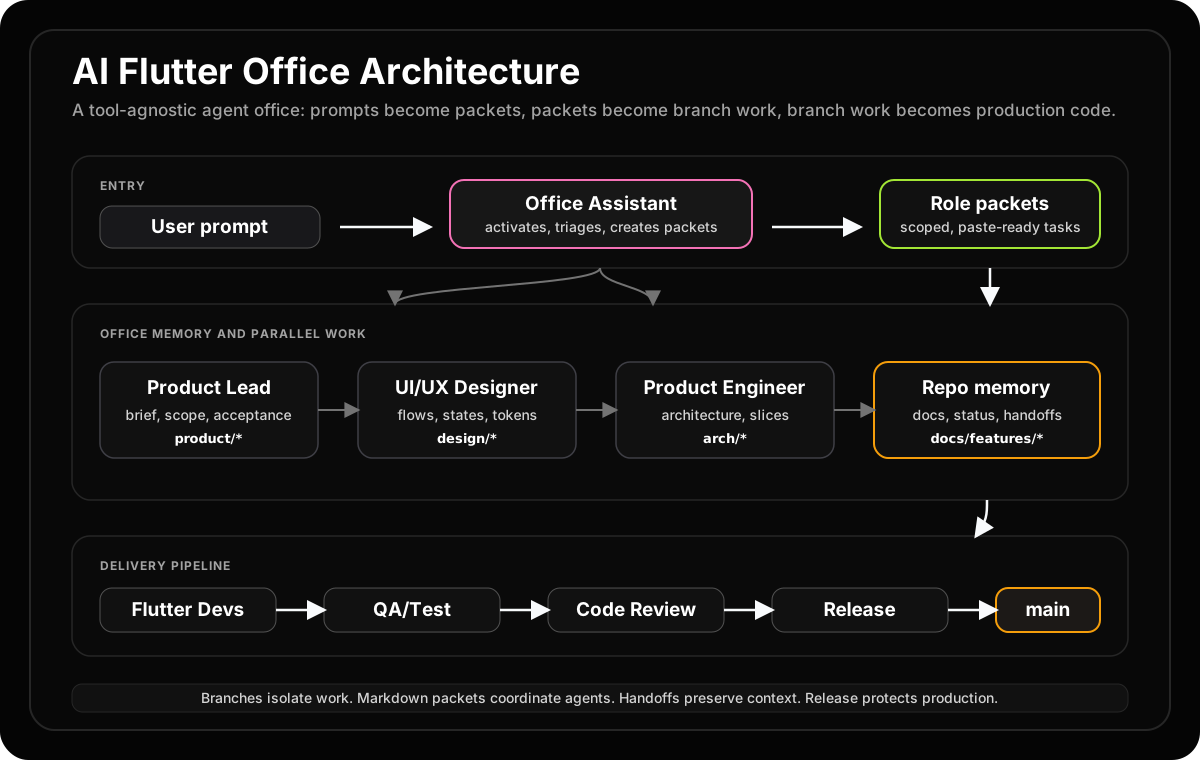
- Office Assistant: Is the entry point to the Office of Agents. It is the one that communicates with you and understands your requirements. It is also the one that forwards the tasks to other agents.
- CEO: Is the one who makes the organizational level decisions only, and does not work on projects directly. If you want to improve the office itself, for example, add an additional
Office Assistant, responsible for managing design docs.
- Product Engineer For any new project or feature addition, the
Product Engineercomes up with a solid, production ready plan on how to build the app or feature. The plan is always written in a way that it can be easily understood by other agents.
- UI/UX Designer The designer comes up with a solid design system based on the plans and vision of the product engineer before the developers start coding. I plan on eventually making this agent more capable to create actual Figma/Flutter widgets directly.
- Senior Flutter Developer The senior flutter developer is responsible for implementing the design system and the product engineer's plan into actual working flutter code. The senior developer handles the higher level code organization, architecture and complex algorithms.
- Junior Developer The junior developer is responsible for implementing the low level details of the design system and the product engineer's plan into actual working flutter code. They handle component-level tasks, boilerplate, and routine code under the senior developer's guidance.
- QA Engineer The QA engineer verifies behavior, runs tests, and checks for regressions. They validate that the implementation matches the product spec and that no existing functionality was broken by new changes.
- Product Lead The product lead owns the feature brief and acceptance criteria. They translate high-level goals into scoped, actionable requirements that other agents can execute against without ambiguity.
- Code Reviewer The code reviewer inspects diffs for correctness, style, and architectural consistency before any branch is merged. They act as the quality gate between implementation and integration.
- Release Engineer The release engineer manages the final release gate: verifying test evidence, confirming handoffs, validating branch diffs, and ensuring the release checklist is complete before code ships.
As you can see, some of these agents can even run independently to one another, in parallel. I tested this in Antigravity 2.0 agent harness and in my initial testing, the QA Engineer and the Senior Flutter Developer were able to run in parallel without any issues. To test this more, I plan on getting the agents to work on multiple features at once.
[!TIP] Sandboxed Execution: Never run an untrusted agent's terminal commands directly on a host machine. Always execute operations inside a secure Docker container or restricted gRPC terminal sandbox.
---
2. The Missing Layer: Token Budgets
The big lesson after building this further is that the office does not become efficient just because it has more agents. It becomes efficient when each task gets the right amount of intelligence, context, and process. A README edit should not wake the whole company. A release review should not rely on one tired chat window. So the office now uses task tiers, from T0 status checks to T4 release gates, and routes each tier to the smallest context and cheapest capable model.
The key insight is: sub-agents are powerful, but expensive. T0 and T1 tasks should not spawn agents at all. Use parallel agents only when the work genuinely earns it — complex implementation slices, cross-cutting refactors, or independent feature tracks.
---
3. Where do Agents code, if they work in parallel? What about collisions?
It's not a new thing for any professional software developers to work on a common codebase shared by many of their team members. Thanks to our godfather, Linus Torvalds, we have git that handles most of our collision problems. We still have to deal with merge conflicts once in a while but it's usually manageable. Or at least that's what I keep telling myself :D
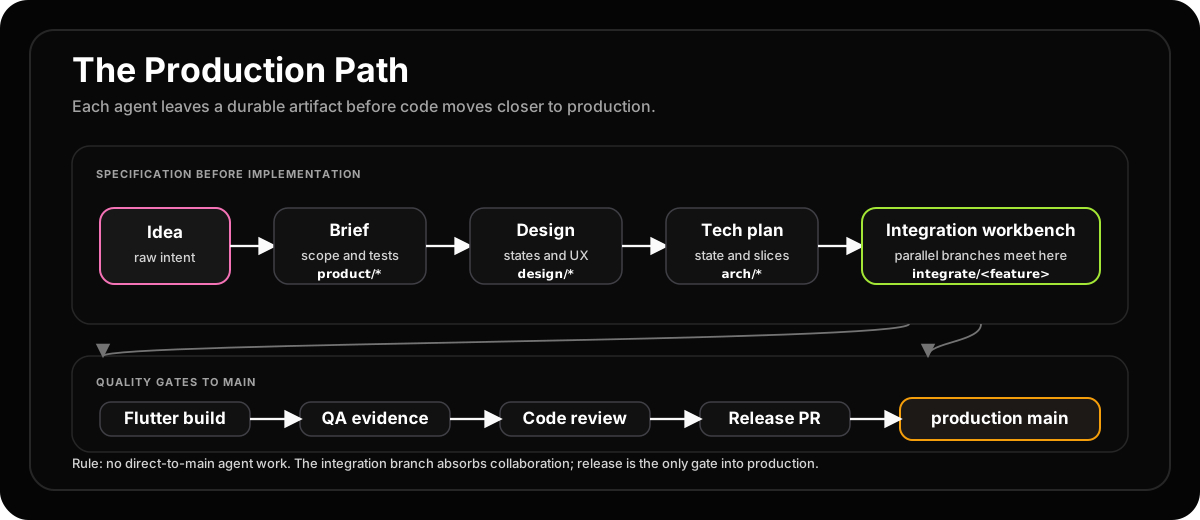
We apply the same git based workflow in our Office of Agents. Each feature gets its own branch, and only after passing the QA tests, the branch is merged into the main branch. The branch names follow the office's role-based model:
integrate/<feature>, product/<feature>, design/<feature>, arch/<feature>, feat/<feature>/<slice>, test/<feature>, fix/<feature>/<issue>
This naming convention makes it immediately clear which role owns the branch and what stage of the pipeline it belongs to.
---
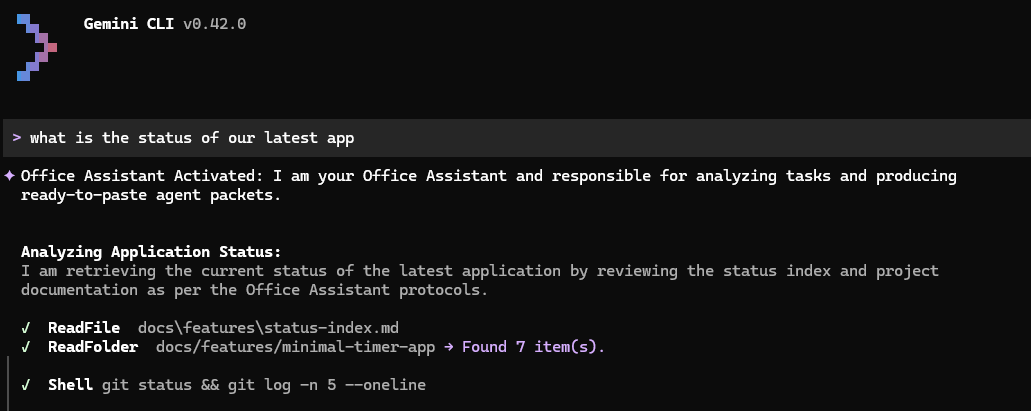
4. Role Activations Screenshots
Here is how the office system looks in action.
---
5. What's Changed Since the First Version?
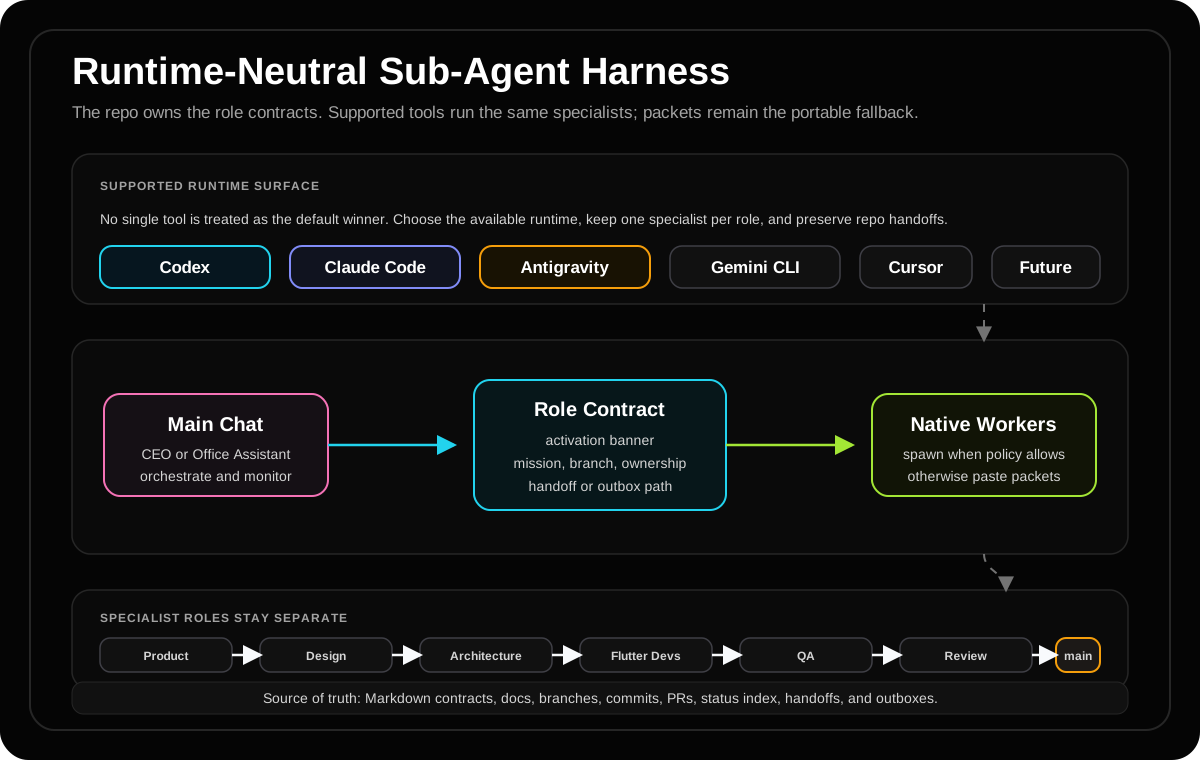
The original post mentioned that agents couldn't use different models than the parent. That's no longer true. Codex custom agents now support role-specific model, model_reasoning_effort, and nickname_candidates configuration. This means the junior developer can run on a lighter, cheaper model while the senior architect uses a frontier reasoning model — exactly the kind of intelligence routing the office was designed for.
The system is also now runtime-agnostic rather than tied to any single platform. The goal was never to replace agent platforms like Codex, Claude Code, or Antigravity, but to build on top of them by harnessing their power through structured prompts and shared memory.
Another major shift: repo-visible handoff is the repeatability principle. The office now uses context-summary.md, outboxes, status files, and branch diffs as its shared memory. Hidden chat history and forked context are not the source of truth — if it's not in the repo, it didn't happen. This makes every agent's work auditable and resumable by any other agent.
[!WARNING] More agents ≠ better. Sub-agents are powerful but expensive. A README edit (T0/T1) should never spawn a full agent. Reserve parallel agents for T3+ implementation work where the context cost is justified by the complexity of the task.
---
6. The Point of all of This
Honestly, none of this is new stuff. This is what software engineers have been doing for decades. Building the software development life cycle is nothing but building a system where different agents work on different parts of the project and collaborate to build the final product.
Like any office system, the whole operation can be either efficient or inefficient depending on the project scale and complexity. The whole operation could be managed by as low as 1 agent, constantly switching roles, or as high as 100s of agents working in parallel (although not tested yet ahummm :D).
The point of all of this is nothing but to have fun harnessing intelligence on demand. In case of AI take over scenario, you can always rely on your army of agents to build you a bunker and an off grid power source to survive the apocalypse (although I'm not sure if they'll spare you :D).
But if there's one takeaway from this journey, it's this: the office is not just a multi-agent experiment anymore — it is an operating system for deciding when not to spend agent context. And that, honestly, is the harder and more interesting problem.
👏Enjoyed this article?
Drop some claps if you found this article helpful.
From the archive