英語版から機械翻訳しています。 元の記事はこちら
Flutterアプリ向けOffice of AI Agentsを計画する
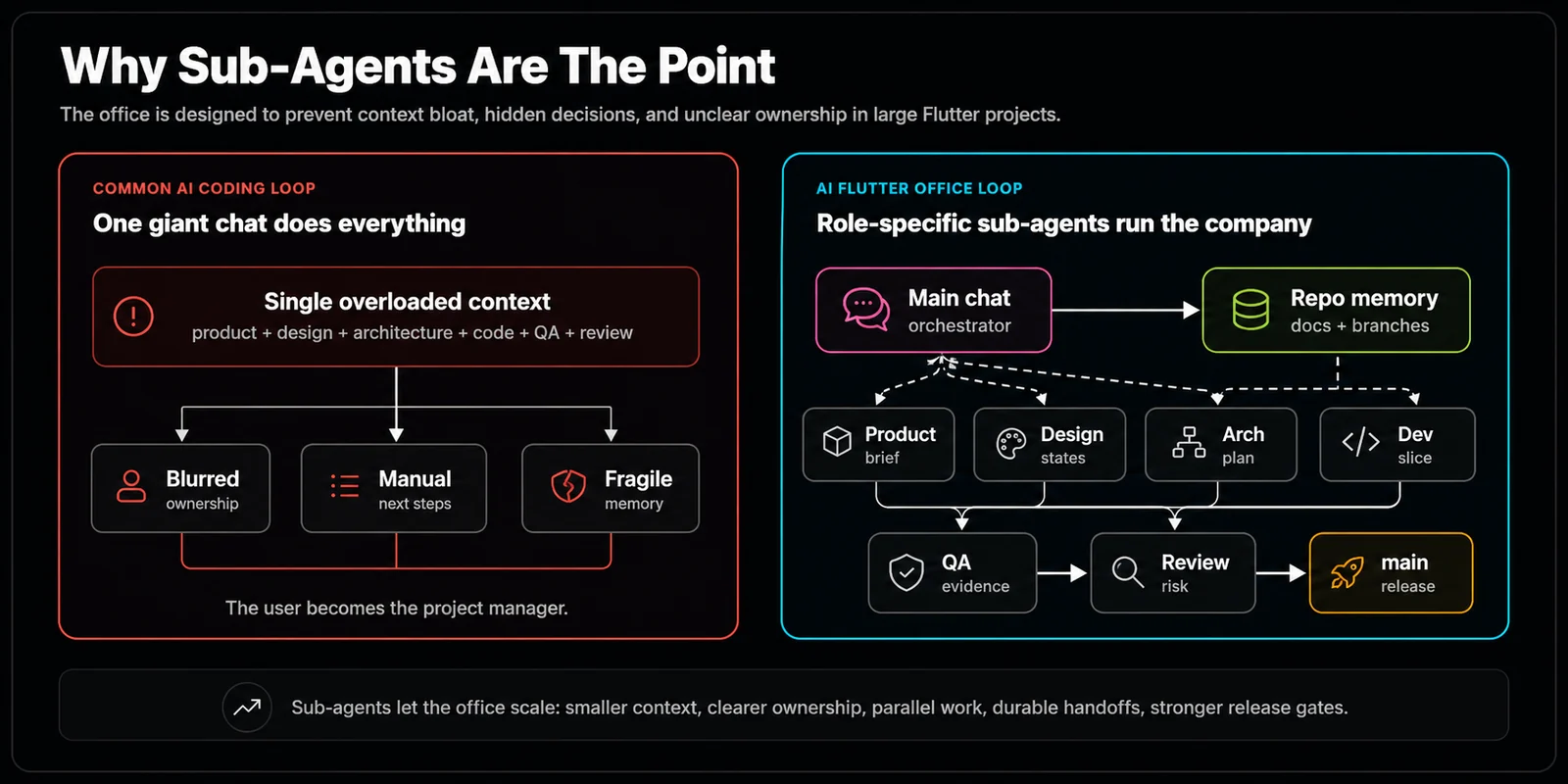
アプリ開発には時間がかかり、さらに重要なことに、エージェントのコンテキストウィンドウも消費します。1つのエージェントが計画、設計、開発、テストのすべてをこなすのはトークン効率が悪く、最適な出力も得られません。そこで、プラットフォーム非依存で、記憶を持ち、本物のソフトウェアチームのように組織されたOffice of Agentsワークフローを作り始めました。
このアイデアを思いついた経緯
私は、AIエージェントにどんなアプリのアイデアでもMVPを作ってもらうのが大好きです。Opus 4.6、GPT 5.5、Gemini 3.1 Proのようなフロンティアモデルは、私の多くのアイデアに対して十分すぎるほど強力です。ただ、多くの場合、開発はMVP段階で止まってしまいます。最初のMVPをきちんと磨くには、大量のプロンプトと複数のコンテキストセッションが必要になります。主な問題の一つは、従来のエージェント開発が1つのチャットセッションに大きく依存し、「この画像を中央に配置するには?」という質問に答える前に、モデルがすべての情報を一度に抱え込むことを期待している点です。
正直、人間の開発者でも、連絡先ページに新しいSNSボタンを追加する前に、プロジェクト内のコード、計画、修正履歴の全行を作業記憶に入れろと言われたら気が狂うと思います。効率が悪すぎます。面白いのは、人間はこの限られた作業記憶の問題を何十年も前から解決していることです。
私たちは書き残すことでこの問題に対処します。人数が多ければ、計画、タスク、期待する成果物を引き継ぎます。ずっと昔からそうしてきました。では、AIエージェントにも、私たちが長い間使ってきた同じワークフローを共有させたらどうでしょうか。
---
1. Office of Agentsのアーキテクチャ
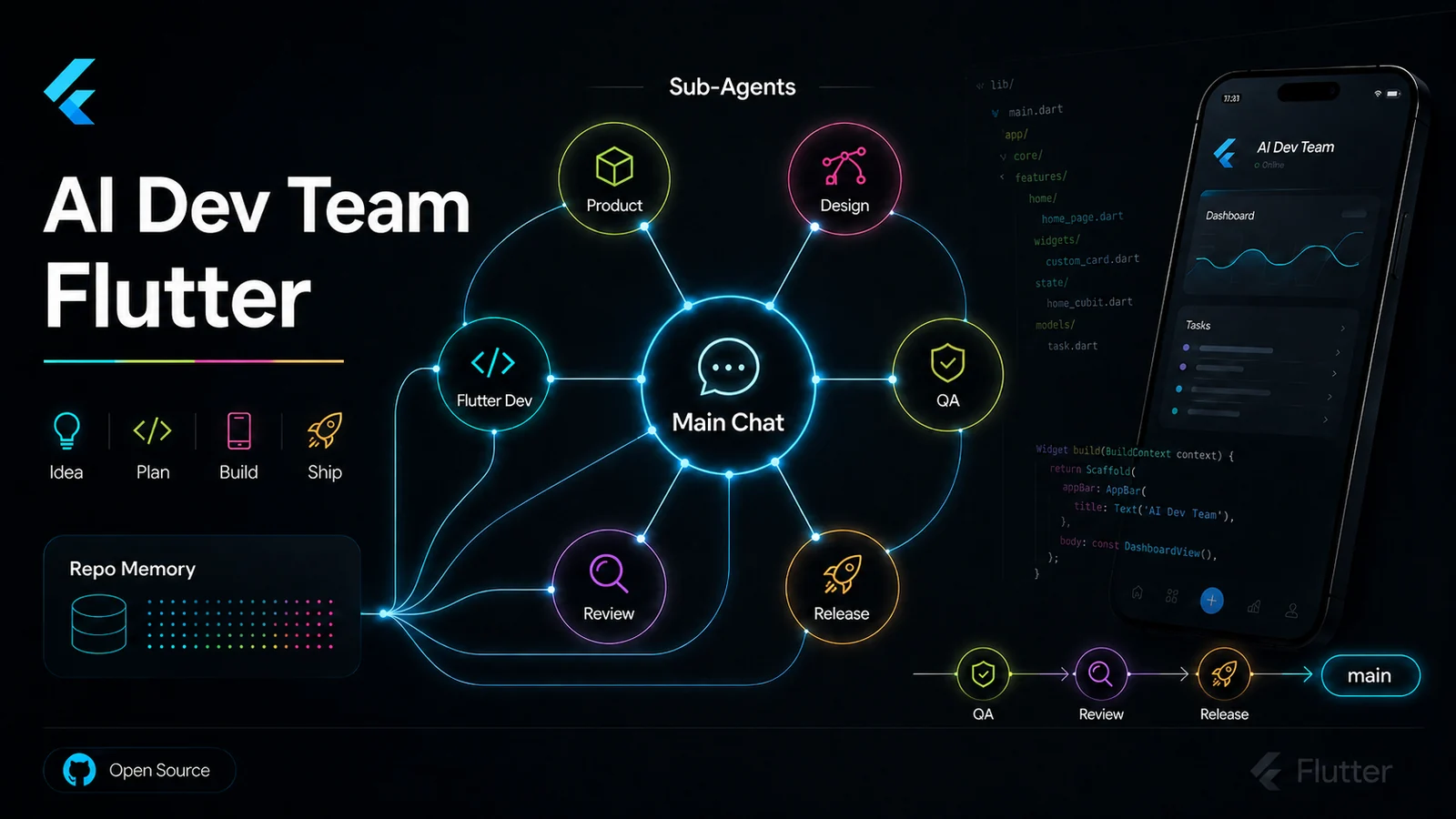
このプロジェクトは、Codex、Claude Code、Antigravityのようなエージェント開発プラットフォームで使える、整理されたプロンプト群です。新しいプロジェクトは、特定の役割と責任を持つAIエージェントのグループによって処理されます。
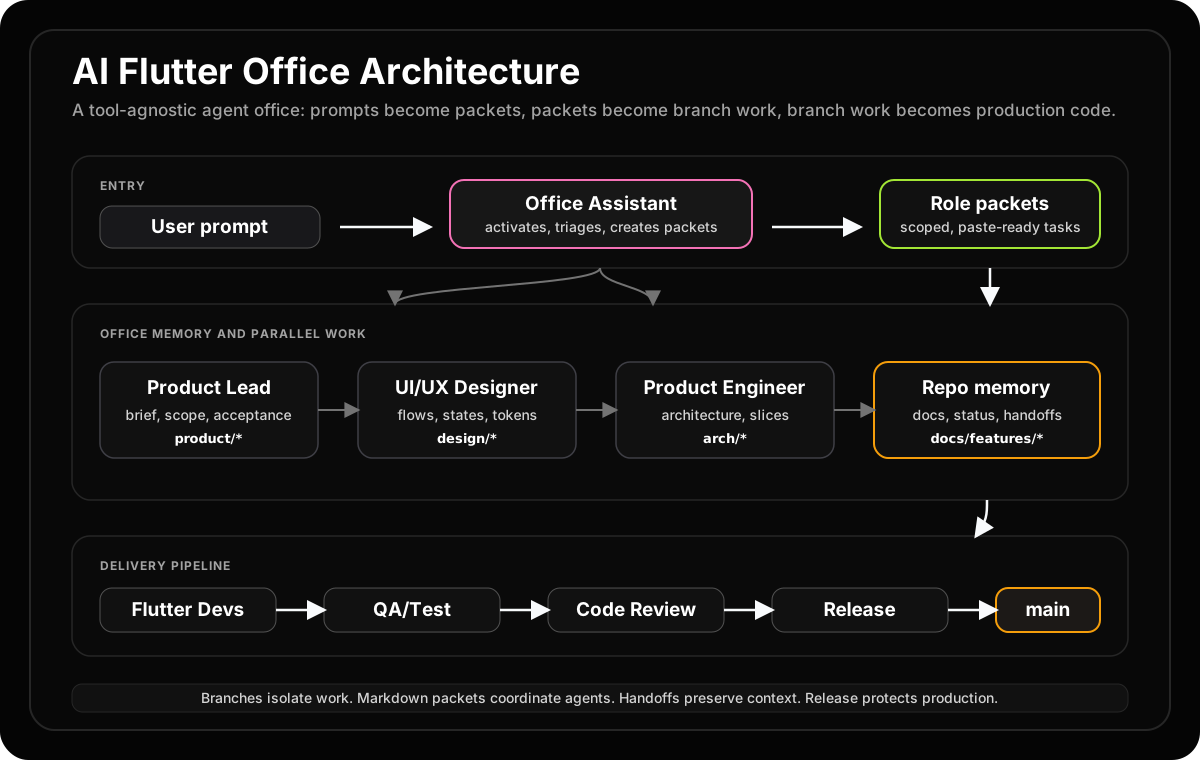
- Office Assistant: Office of Agentsの入口です。ユーザーとやり取りし、要件を理解し、他のエージェントへタスクを渡します。
- CEO: 組織レベルの判断だけを行い、プロジェクト作業は直接行いません。たとえば、デザインドキュメント管理を担当する追加の
Office Assistantを作るなど、オフィス自体を改善したい時に使います。
- Product Engineer: 新しいプロジェクトや機能追加に対して、アプリや機能をどう作るかの本番向け計画を作ります。その計画は、他のエージェントが理解しやすい形で書かれます。
- UI/UX Designer: 開発者がコードを書き始める前に、Product Engineerの計画とプロダクトのビジョンをもとにデザインシステムを作ります。将来的には、このエージェントが実際のFigmaやFlutterウィジェットを直接作れるようにしたいです。
- Senior Flutter Developer: デザインシステムとProduct Engineerの計画を、実際に動くFlutterコードへ実装します。上位レベルのコード構成、アーキテクチャ、複雑なアルゴリズムを担当します。
- Junior Developer: Junior Developerは、デザインシステムとProduct Engineer of AI Agentsの計画の低レベルな詳細を、実際に動くFlutterコードへ実装します。Senior Developerの指導のもと、コンポーネントレベルのタスク、ボイラープレート、日常的なコード作成を担当します。
- QA Engineer: QA Engineerは、挙動の検証、テストの実行、およびデグレード(デグ)のチェックを行います。実装がプロダクト仕様と一致していること、および新しい変更によって既存の機能が壊れていないことを検証します。
- Product Lead: Product Leadは、機能の要件定義書(ブリーフ)と受入基準を所有します。曖昧さなく他のエージェントが実行できるように、高レベルのゴールを具体的かつ実用的な要件に変換します。
- Code Reviewer: Code Reviewerは、ブランチがマージされる前に、コードの正確性、スタイル、およびアーキテクチャの整合性を検証するために差分(diff)を検査します。実装と統合の間の品質ゲートとして機能します。
- Release Engineer: Release Engineerは最終的なリリースゲートを管理します。テスト結果の証跡を確認し、引き継ぎを完了させ、ブランチの差分を検証し、コードが出荷される前にリリースのチェックリストがすべて満たされていることを保証します。
このように、一部のエージェントは互いに独立して並列実行できます。Antigravity 2.0のエージェントハーネスで試したところ、QA EngineerとSenior Flutter Developerは問題なく並列で動きました。さらに検証するため、今後は複数の機能を同時に進めさせる予定です。
[!TIP] サンドボックス実行: 信頼できないエージェントのターミナルコマンドをホストマシンで直接実行しないでください。必ず安全なDockerコンテナや制限されたgRPCターミナルサンドボックス内で実行してください。
---
2. 不足していたレイヤー:トークン予算
この取り組みを進める中で得られた最大の教訓は、単にエージェントの数を増やしたからといってオフィスが効率的になるわけではないということです。各タスクに対して、適切な量の知能、コンテキスト、およびプロセスが割り当てられた時に初めて効率的になります。READMEの微修正のために会社全体を起こす必要はありません。リリースのレビューを、1つの疲弊したチャットウィンドウに頼るべきではありません。そのため、現在のオフィスではT0のステータスチェックからT4のリリースゲートまでのタスク階層(タスクティア)を採用し、各ティアを最小のコンテキストと最も安価で対応可能なモデルにルーティングしています。
最も重要な知見は、「サブエージェントは強力だが、コストがかかる」ということです。T0およびT1のタスクではエージェントを起動すべきではありません。複雑な実装スライス、横断的なリファクタリング、独立した機能開発など、コンテキストコストを支払う価値がある場合にのみ並列エージェントを使用します。
---
3. 並列で動くなら、エージェントはどこでコードを書くのか?衝突はどうするのか?
プロのソフトウェア開発者が、チームの多くのメンバーと同じコードベースで作業するのは珍しいことではありません。私たちの偉大なる先人Linus Torvaldsのおかげで、gitが衝突問題の多くを処理してくれます。もちろん、たまにはマージコンフリクトも起きますが、だいたい何とかなります。少なくとも私はそう自分に言い聞かせています。笑
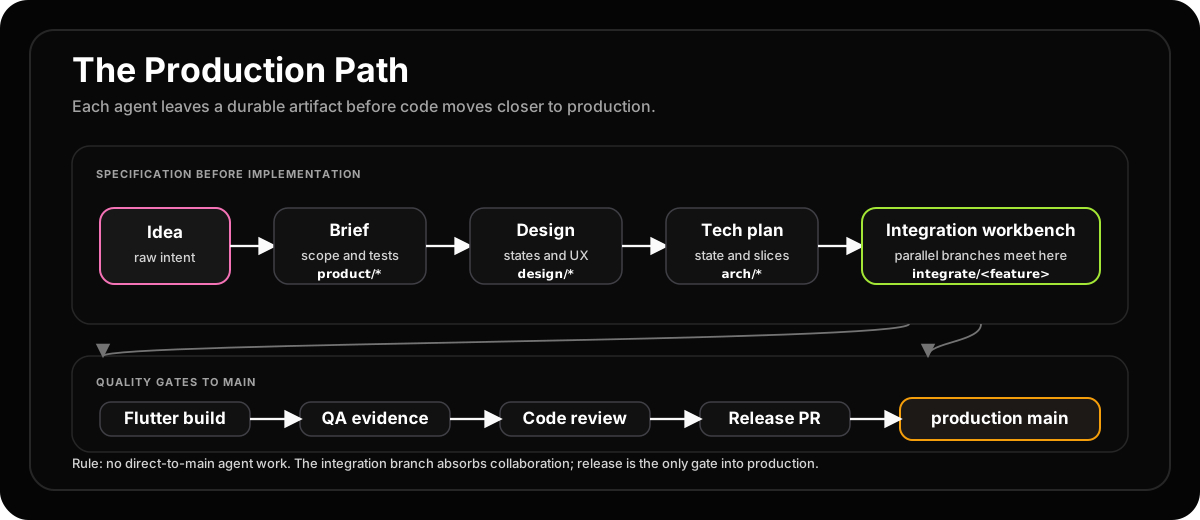
Office of Agentsでも同じgitベースのワークフローを適用します。各機能はそれぞれのブランチを持ち、QAテストに合格してからmainブランチへマージされます。ブランチ名はオフィスの役割ベースのモデルに従います。
integrate/<feature>, product/<feature>, design/<feature>, arch/<feature>, feat/<feature>/<slice>, test/<feature>, fix/<feature>/<issue>
この命名規則により、どの役割がそのブランチを所有し、それがパイプラインのどの段階にあるのかが即座に明確になります。
---
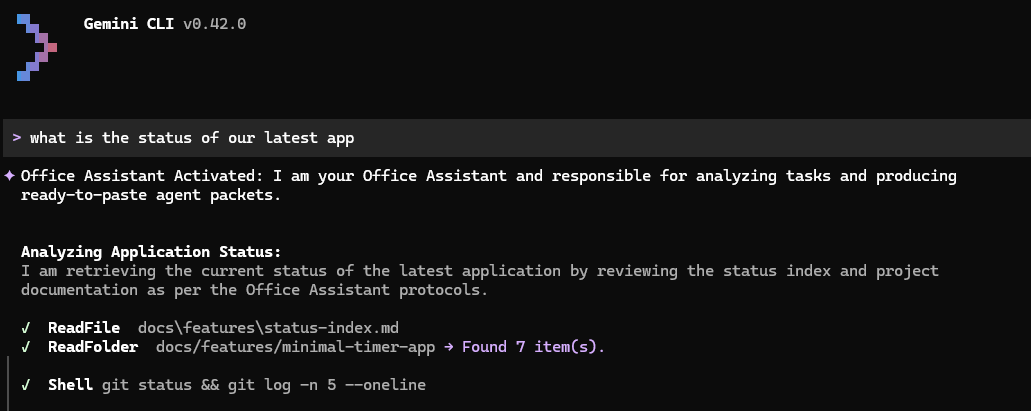
4. 役割アクティベーションのスクリーンショット
オフィスシステムが実際に動いている様子です。
---
5. 初期バージョンからの変更点
最初の投稿では、エージェントは親と同じモデルしか使えないと書きました。しかし、これはもう過去の話です。Codexのカスタムエージェントは、役割ごとに model、model_reasoning_effort、および nickname_candidates を設定できるようになりました。これにより、Junior Developerは軽量で安価なモデルで実行し、Senior Engineerは高度な推論モデルを使用するという、まさにオフィスの設計思想通りの「知能ルーティング」が可能になりました。
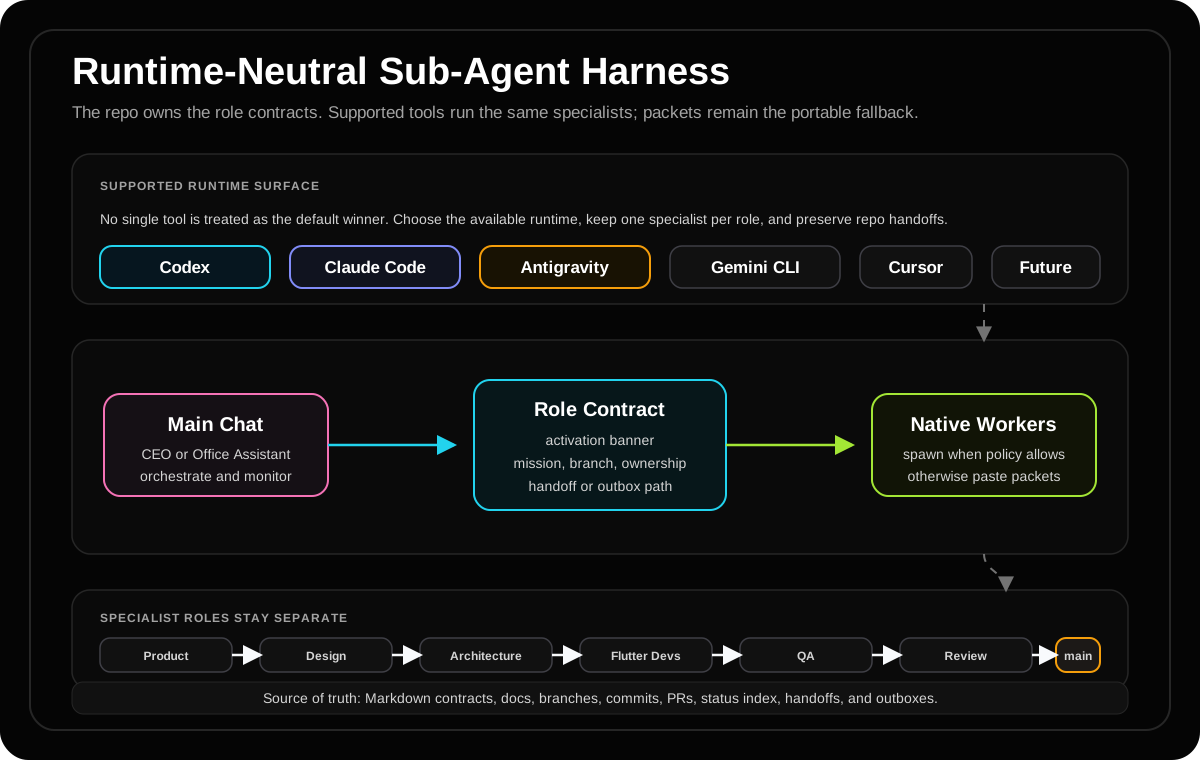
また、システムは特定のプラットフォームに依存しない、ランタイム非依存な設計に進化しました。目的は、Codex、Claude Code、Antigravityなどのエージェントプラットフォームを置き換えることではなく、構造化されたプロンプトと共有メモリを通じて、それらの力を最大限に引き出すことです。
もう一つの大きな変化は、「リポジトリに見える形での引き継ぎが再現性の原則である」ということです。オフィスでは、context-summary.md、アウトボックス、ステータスファイル、およびブランチの差分を共有メモリとして使用します。隠されたチャット履歴や分岐したコンテキストは一次情報源ではありません。リポジトリに存在しないものは、起こらなかったのと同じです。これにより、すべてのエージェントの作業が監査可能になり、後続のセッションで再開できるようになります。
[!WARNING] エージェントの多さ = 良さ ではありません。 サブエージェントは強力ですが高コストです。Readmeの編集(T0/T1)でエージェントを丸ごと起動させるべきではありません。コンテキスト費用がタスクの複雑さによって正当化される、T3以上の実装作業のために並列エージェントを残しておきましょう。
---
6. 結局、何がポイントなのか
正直に言うと、ここにあるものは完全に新しいものではありません。これはソフトウェアエンジニアが何十年もやってきたことです。ソフトウェア開発ライフサイクルを作るというのは、別々の担当者がプロジェクトの各部分に取り組み、協力して最終プロダクトを作るシステムを作ることです。
どんなオフィスシステムでも同じですが、プロジェクトの規模や複雑さによって、全体の運用は効率的にも非効率にもなります。全体の運用は、最小1つのエージェントが役割を切り替えながら処理することも、最大100以上のエージェントが並列で動くことも可能です(後者はまだ本格テストしていませんが笑)。
結局のところ、これはオンデマンドで知能を使う楽しさを味わうためのものです。もしAIが世界を乗っ取るシナリオになったとしても、エージェント軍団に頼んで、地下シェルターとオフグリッド電源を作ってもらえるかもしれません。まあ、彼らが私たちを見逃してくれるかは分かりませんが。笑
しかし、この旅から得られた教訓が一つあるとすれば、それはこれです:このオフィスはもはや単なるマルチエージェントの実験ではなく、エージェントのコンテキストを「いつ使わないか」を決定するためのオペレーティングシステムであるということです。そしてそれこそが、間違いなくより困難で、より興味深い問題なのです。
👏この記事は参考になりましたか?
この記事が役に立ちましたら、ぜひ拍手を送ってください。
アーカイブから